Skip to content

Find care tenders worth your time.

Your services. Your area. Your evidence. Care Intel uses your business details and documents to find relevant public notices, then explains why they fit and what still needs checking.

Notices from Find a Tender and Contracts Finder, checked every 6 hours

Matching notices for providers of

  • Domiciliary care
  • Supported living
  • Live-in care
  • Extra care
  • Complex care
  • Dementia care
  • Learning disabilities
  • Mental health
  • Children and young people
  • Nursing care

Recorded in the working app with a fictional provider and live public notices.

Finding a notice is only the start.

Find a Tender and Contracts Finder already offer search filters and free email alerts. You still have to decide whether each result suits your business and whether your evidence supports what the buyer needs.

  • Search results

    Search ≠ fit

    Keywords can find a notice. They don’t tell you whether its services, location and requirements are right for your business.

  • Evidence

    Scattered

    Policies, CQC reports and case studies sit in shared drives, so checking a requirement means hunting through them each time.

  • The decision

    Still yours

    Even with a bid writer, you need to understand what you’re pursuing before committing your team and budget.

Care Intel brings your services, your area and your evidence together, so each notice arrives with the reasons it fits.

Workspace, for the bids you choose to pursue.

Add Care Intel Workspace when you want a live feed, an evidence library and a pipeline for every bid, alongside your weekly Alerts.

Live notices, filtered for care

Open tenders from the UK's main procurement sources, narrowed to your services and coverage. Planning notices appear as early signals before they open.

Matching you can check

Each fit score comes with its reasons, citing your own documents, and the requirements you can't yet evidence.

A pipeline to submission

Track each bid from shortlist to final submission, including the handoff to a bid writer, with deadlines in view.

One evidence library

Your policies, financials and track record, read and filed automatically, with a checklist of the core evidence tenders ask for.

Let relevant tenders come to you.

Care Intel Alerts is email only. You don’t need a bid-management workspace to get a useful shortlist: Alerts uses your saved business details and read documents to find notices worth investigating.

  • Matched to the care you deliver and the areas you cover
  • Supporting evidence cited by filename, with requirements still to check
  • Open tenders, early notices and links to the original source, reviewed before sending
Explore personalised Alerts

Sign-ups are being prepared. Book a private demo to see the current flow.

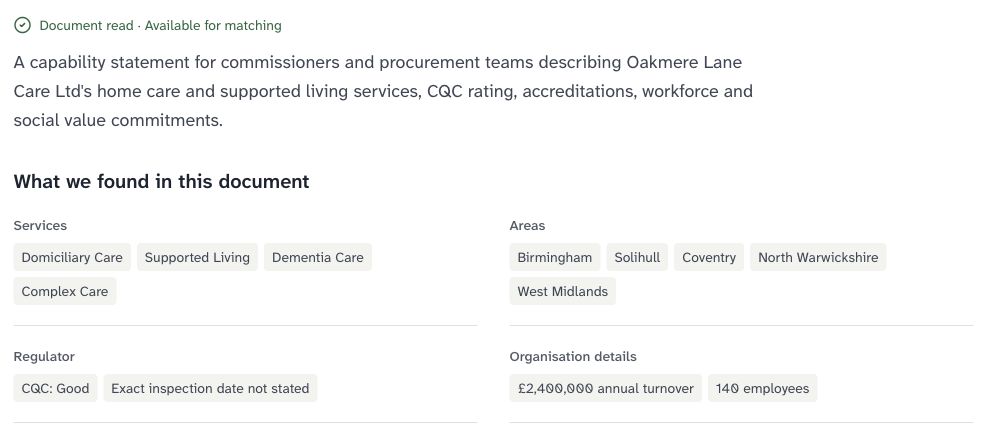
Read capability-statement findings showing the fictional provider’s services, coverage, CQC statement and organisation details

Facts read from a fictional provider’s capability statement in the real Alerts account.

Your documents explain every match.

The evidence you already hold for tenders becomes the evidence each match can cite, in Alerts and in Workspace alike.

  • Upload a capability statement, policies or an inspection report
  • Review the findings and confirm suggested business details yourself
  • Unread or failed documents never count as evidence

From public notices to your personal shortlist.

Watch how Alerts connects business details and documents to a reviewed email, then explore Workspace in the product film and walkthrough.

From another search to an informed shortlistFictional provider. Real account, document findings and delivered test email.
Watch the Workspace product filmEvidence, explained matches and a pipeline for the bids you choose.
Watch the application walkthroughFollow the real document review, notice check and saved bid stage.

See the working app.

Real recordings from Care Intel Workspace, from a capability statement to a tracked bid. Pick a step, or let the tour play through.

Recorded in the working app: a fictional provider with live public notices, filmed 26 October 2026.

Start with the business behind the bid.

Four steps from what you deliver to the tenders worth pursuing. Your details and documents do the work every week after.

  1. 1

    Describe your business

    Set the care services you deliver, where you work and the business details relevant to a bid.

  2. 2

    Add your documents

    Upload a capability statement, policies or inspection report. Review the findings and confirm suggested business details.

  3. 3

    Get explained matches

    New public notices are checked against your saved information and read documents, with the reasons and requirements to check.

  4. 4

    Choose what to pursue

    Follow the original notice and share it with your team or bid writer. Add Workspace for a live feed and bid tracking.

Built for providers who already bid.

Keep control of which opportunities you pursue, whether you write bids in-house or work with a specialist bid writer.

CQC-registered care providers

Domiciliary care, supported living, residential, nursing or complex care. Your services and coverage decide what reaches you.

You already hold the evidence

Policies, inspection reports and case studies become evidence each match can cite.

Relevant frameworks sooner. Every bid tracked.

Early notices arrive before a tender opens, so there's time to prepare. The bids you choose move through one pipeline, from qualification to submission, whether you write in-house or with a bid writer.

Common questions, straight answers.

Something not covered here? Ask us in a private demo, with notices for your own services and area.

Book a private demo
Does the fit score predict whether we’ll win?

No. The fit score shows how closely a notice matches your services, area and evidence. It isn’t a prediction, an eligibility decision or regulatory verification, and it’s never presented as one.

How is this different from the free alerts on Find a Tender?

Find a Tender and Contracts Finder offer saved searches and free email alerts. Care Intel adds matching against your business details and facts read from your documents, explains why each notice fits, cites supporting documents and flags requirements still to check. The original public notice remains the source.

Will Care Intel write our bids?

No. Care Intel helps you find relevant notices, check your evidence and track each bid through writing, review and submission. The writing stays with your team or your bid writer.

Where do the notices come from?

Find a Tender and Contracts Finder, checked every 6 hours. Notices published only on councils’ own portals, or only on the Scottish, Welsh or Northern Irish portals, are not included.

What if a notice doesn’t state its value or deadline?

You’ll see “Value not stated” or “TBC”, never an estimate dressed up as fact.

Who is Care Intel for?

CQC-registered providers of domiciliary care, supported living, residential, nursing or complex care who already bid, whether they write in-house or with a specialist bid writer.

A useful nudge when your care documents need a look.

Document review is in development: renewal reminders and relevant guidance updates linked to your documents. Watch the preview and tell us what you’d want it to watch.

Get early access

See it with live notices for your area.

Tell us what care you deliver and where, and we’ll arrange a private walkthrough of Alerts and the optional Workspace around your business.

  • We reply by email
  • Real notices for your area
  • Alerts or Workspace, your choice
Services you deliver (optional)